

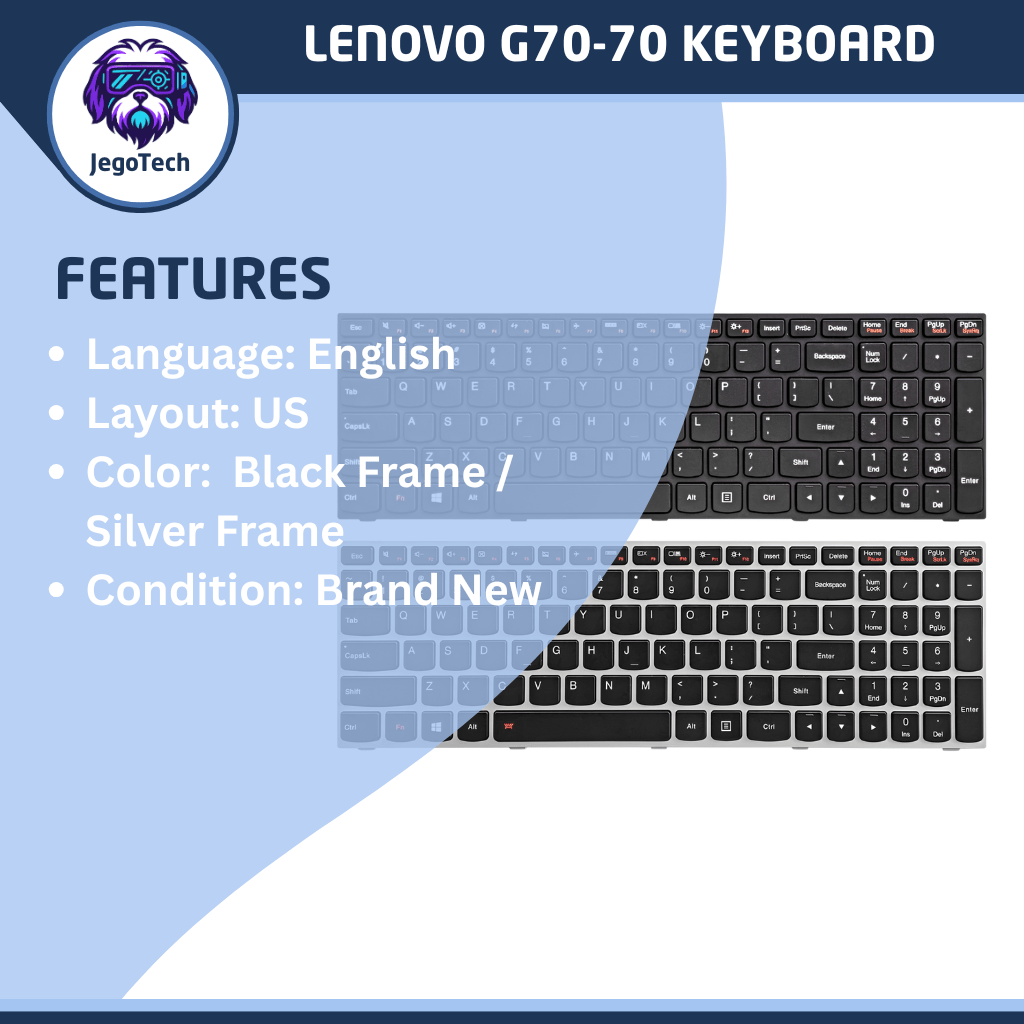
Lenovo G70-70 Replacement Keyboard US Language Layout
Don’t let a faulty keyboard slow you down. The Lenovo G70‑70 Keyboard Replacement restores your laptop’s performance with precision keys, durable construction, and seamless compatibility — perfect for students, professionals, and everyday users who rely on their device for productivity.
₱750.00


Designed specifically for the Lenovo G70‑70 series, this replacement keyboard offers a full‑size layout with responsive keys that make typing smooth and accurate. Whether your original keyboard is worn out, missing keys, or malfunctioning, this replacement provides a cost‑effective solution to get your laptop back in action.
Key Features
- Responsive Typing Experience: Crisp keystrokes improve accuracy and comfort.
- Full‑Size Layout: Includes function keys and numeric keypad for maximum productivity.
- Plug‑and‑Play Installation: No special tools required; simply replace and resume work.
- Durable Keycaps & Switches: Built to withstand heavy daily use without fading or sticking.
- Exact Fit for Lenovo G70‑70: Engineered for perfect compatibility, ensuring easy installation.
Benefits
- Save Money: Avoid replacing the entire laptop by swapping out the keyboard.
- Enhance Comfort: Smooth, responsive keys reduce typing fatigue during long sessions.
- Boost Efficiency: Numeric keypad and function keys make multitasking faster and easier.
- Restore Productivity: Get your laptop back to full functionality without costly repairs.
Why Choose This Replacement?
Unlike generic alternatives, the Lenovo G70‑70 Keyboard Replacement is precision‑made for your laptop model, guaranteeing compatibility and reliability. Its durable build and responsive design ensure long‑term satisfaction, making it the smart choice for Lenovo users.
Social Proof
Customers appreciate the easy installation and like‑new typing experience this replacement provides. Many highlight how it saved them from buying a new laptop, proving its value as a practical and affordable solution.
Take Action
Don’t wait until your productivity suffers. Order the Lenovo G70‑70 Keyboard Replacement today and enjoy a laptop that feels brand new again.
Is There a Guide To Replace The Lenovo G0-70 Keyboard
Yes, here is the complete step-by-step guide to replacing the keyboard on a Lenovo G70-70 laptop.
Step 1: Remove the Battery (Crucial for Safety)
- Shut down the laptop entirely and unplug the charger.
- Flip the laptop over so the bottom base faces you.
- Slide the left battery latch to the left (unlock position).
- Slide and hold the right battery latch to the right.
- The battery will pop up slightly; lift it up and out of the laptop.
Step 2: Remove the Back Cover
- Locate the two 7.3 mm Phillips #0 screws holding the large plastic back cover in place. Uncscrew them.
- Slide the back cover forward (towards your body) and lift it off.
Step 3: Remove the Keyboard Base Screws
- Look closely at the newly exposed components. You need to find three 6.2 mm Phillips #0 screws that secure the keyboard. Tip: Lenovo labels these on the plastic frame with a tiny “M2X6” or a small keyboard icon next to the screw holes.
- Remove all three screws.
Step 4: Pry and Release the Keyboard
- Flip the laptop back over and open the screen.
- Take your plastic pry tool and gently wedge it into the upper corner gap between the keyboard edge and the palm rest.
- Slide the tool carefully around the perimeter to release the plastic clips holding the keyboard down.
- Slowly lift the keyboard up from the screen side, but do not pull it away entirely yet.
Step 5: Disconnect the Ribbon Cable
- Underneath the tilted keyboard, you will see a wide, flat ribbon cable plugged into the motherboard.
- Use your fingernail or a plastic tool to flip the tiny plastic locking lever on the connector up 90 degrees.
- Gently slide the ribbon cable out of the slot. You can now fully remove the old keyboard.
Step 6: Install the New Keyboard
- Take your new keyboard and slide its ribbon cable straight into the motherboard connector slot.
- Flip the plastic locking lever back down to clamp the cable securely in place.
- Insert the bottom plastic tabs of the keyboard into the lower edge of the laptop frame first.
- Press down gently along the outer edges until the keyboard clicks flat into place.
- Flip the laptop back over, replace the three keyboard screws, slide the back cover on, tighten its screws, and snap the battery back in.
For a complete breakdown of this process accompanied by visual aids, panoorin nyo ang video nato: https://youtube.com/shorts/iyscc0w0RRI
Conclusion
The Lenovo G70‑70 Keyboard Replacement combines precision, durability, and affordability to restore your laptop’s performance. With easy installation and responsive keys, it’s the perfect solution for anyone who wants to type comfortably and work efficiently.
Bring your Lenovo back to life — one keystroke at a time.
Buy this Lenovo G70-70 Replacement Keyboard Today!
Please don’t forget to bookmark buy.chubbable.com, and re-visit for more Computer Parts & Accessories

There are no reviews yet.